Single Sign-On (SSO*) is a feature in MOSS that provides storage and mapping of credentials. BDC and SSO are two different components in MOSS, however, SSO discussions in this article is tied with BDC and how SSO is used in BDC.
Following article (http://technet.microsoft.com/en-us/library/cc262932.aspx) shows how SSO can be configured in MOSS.
Limitations of SSO:
a) SSO works when MOSS is installed in domain ( SSO does not work when SharePoint is installed in Workgroup ).
b) SSO does not work when MOSS is configured in Forms Based Authentication mode ( FBA ).
c) Master key backup is allowed only on a floppy disk (A:)
d) No localization
e) No tools for bulk upload (credentials)
Fortunately, MOSS allows us to write our own "SSO" by implementing ISsoProvider interface. ISsoProvider interface is defined in Microsoft.SharePoint.SingleSignOn namespace and Microsoft.SharePoint.Portal.SingleSignOn.dll assembly ( url: http://msdn.microsoft.com/en-us/library/microsoft.sharepoint.portal.singlesignon.issoprovider.aspx )
Implementing ISsoProvider:
Rather than iterating the implementation of the ISsoProvider, here is a walkthrough (http://msdn.microsoft.com/en-us/library/ms566925.aspx) of implementing ISsoProvider.
Registering SSO with BDC
MOSS allows only one default SSO provider ( default is SpsSsoProvider ), however BDC can work with multiple SSO providers. SSO provider for BDC is defined in BDC metadata model.
In the metadata model, register your SSO provider with the following code
<Property Name="SsoApplicationId" Type="System.String">AppId</Property>
<Property Name="SsoProviderImplementation" Type="System.String">MySsoProvider, My.SingleSignon, Version=1.0.0.0, Culture=neutral, PublicKeyToken=71e9def111e9429c</Property>
The above code assumes that your SSO provider is "MySsoProvider" and is present in "My.SingleSignOn" assembly.
Notes:
* SSO in MOSS is a misnomer. From the name, Single Sign-On, it appears that SSO will automatically log user into other systems. However, in reality, it only provides storage, retrieval and mapping of credentials. Other components ( such as BDC, Excel Services, Access Services etc. ) logs the user to other systems by retrieving user credentials from SSO.
Showing posts with label MOSS 2007. Show all posts
Showing posts with label MOSS 2007. Show all posts
Tuesday, January 13, 2009

Sunday, October 19, 2008
BDC : Beyond Web-Service and Database
As discussed in the previous post, Business Data Catalog only supports LOB of type web-service and database. What if you want to display your business data from your LOB through adapters ?
A little known fact of BDC is, its support of web-service through GACed proxy. Typically BDC generates web-service proxy at runtime from the WsdlFetchUrl property specified in the metadata. Instead of using WsdlFetchUrl property if
WebServiceProxyType property is used, BDC loads the proxy from GAC. The property WebServiceProxyType is specified at the LOBSystem level.
Sample
In this sample, an entity Employee will be displayed in the Business Data List where the entity is is fetched from local assembly ( GACed assembly ).
Employee entity contains the following fields as described below
AdventureWorks class (data fetched from AdventureWorks sample database) defines finder and specific finder (namely GetEmployees and GetEmployee methods).
The point to note is AdventureWorks is a subclass of HttpWebClientProtocol. Once the assembly is created with AdventureWorks class and Employee class and GACed, its time to hook Employee entity with BDC.
Assuming the namespace of the AdventureWorks and Employee class to "Beyond" and FullName of the assembly is "BeyondAdvWorks, Version=1.0.0.0, Culture=neutral, PublicKeyToken=22c970e70e320837".
The following metadata defines a LobSystem of type WebService and registers Beyond.AdventureWorks class as the proxy for the webservice using WebServiceProxyType property.
Click on the following figure to see the LobSystem definition.
Finally the two methods are modeled in the metadata ( the figure contains Finder method, download the sample for complete metadata ).
In the methods, fully qualified name is used to define the TypeDescriptor for Employee class.
After hooking the Employee entity with Business Data List, the following figure shows the individual Employee.
See the previous post for how to hook finder and specific finder methods to the Business Data List.
Source Code
Sample with complete source code can be downloaded from here.
As-is
The source code/software is provided "as-is". No claim of suitability, guarantee, or any warranty whatsoever is provided. Source Code and executable files can not be used in commercial applications.
A little known fact of BDC is, its support of web-service through GACed proxy. Typically BDC generates web-service proxy at runtime from the WsdlFetchUrl property specified in the metadata. Instead of using WsdlFetchUrl property if
WebServiceProxyType property is used, BDC loads the proxy from GAC. The property WebServiceProxyType is specified at the LOBSystem level.
Sample
In this sample, an entity Employee will be displayed in the Business Data List where the entity is is fetched from local assembly ( GACed assembly ).

Figure 1: Employee Business Data List
Employee entity contains the following fields as described below
Employee
    Id - int
    LoginId - string
    FirstName - string
    LastName - string
    Title - string
AdventureWorks class (data fetched from AdventureWorks sample database) defines finder and specific finder (namely GetEmployees and GetEmployee methods).
public class AdventureWorks : HttpWebClientProtocol
{
public IListGetEmployees(string filterName){ ... }
public Employee GetEmployee(int id){ ... }
}
The point to note is AdventureWorks is a subclass of HttpWebClientProtocol. Once the assembly is created with AdventureWorks class and Employee class and GACed, its time to hook Employee entity with BDC.
Assuming the namespace of the AdventureWorks and Employee class to "Beyond" and FullName of the assembly is "BeyondAdvWorks, Version=1.0.0.0, Culture=neutral, PublicKeyToken=22c970e70e320837".
The following metadata defines a LobSystem of type WebService and registers Beyond.AdventureWorks class as the proxy for the webservice using WebServiceProxyType property.
Click on the following figure to see the LobSystem definition.

Figure 2 : LobSystem
Entity Employee is defined in the metadata, with identity "Id" of type int ( see following figure ).

Figure 3 : Entity
Finally the two methods are modeled in the metadata ( the figure contains Finder method, download the sample for complete metadata ).

Figure 4 : Methods
In the methods, fully qualified name is used to define the TypeDescriptor for Employee class.
After hooking the Employee entity with Business Data List, the following figure shows the individual Employee.

Figure 5 : Individual entity page
See the previous post for how to hook finder and specific finder methods to the Business Data List.
Source Code
Sample with complete source code can be downloaded from here.
As-is
The source code/software is provided "as-is". No claim of suitability, guarantee, or any warranty whatsoever is provided. Source Code and executable files can not be used in commercial applications.
Friday, September 19, 2008
Business Data Catalog
Business Data Catalog (BDC) is a feature of Microsoft Office SharePoint Server ( MOSS 2007) which provides a mechanism to bring and display business data on SharePoint. BDC is simple yet powerful to use because of its no-code solution.
Power of BDC
Consider this, there is a web-service (or database) which exposes your Line of Business (LOB) data and you want to see the data on SharePoint. This can be done by writing a custom web-part. You will need a developer to write that custom web-part. Now assume the web-service requires credentials based authentication. Hopefully the developer can still handle that. If the web-service requires unique credentials for each SharePoint user, you will require a smart developer. What about you want to search the data fetched by the web-part ?
BDC's goal is to enable you to surface business data (some of the aspects described above) in Office SharePoint Server 2007 with minimal coding effort. BDC requires one to write [n1] XML based metadata.
BDC Web Part - Adventure Works Sample
MOSS 2007 comes with five Business Data Web Parts [r3] which can display a list of entity instances, display details of an entity instance, display list of related entity instances, display a list of actions associated with an entity and create a Business Data item.
In this sample, a list of entity instances are displayed using Business Data List (BDL) with Adventure Works [r4] database as LOB.

Figure - List of Products in Adventure Works.
Steps in displaying the products list
Step 1 : Install the adventure works 2000 database [r4]
Step 2 : Install SharePoint Server 2007 SDK [r5]
Step 3 : Upload BDC metadata model for Adventure Works from SDK
- Open MOSS Central Administration
- Goto Shared Services Administration page for your shared service
- Click on "Import application definition" in the Business Data Catalog block
- Browse the adventure works model XML from SDK (C:\Program Files\2007 Office System Developer Resources\Samples\Business Data Catalog\AdventureWorks Samples\AdventureWorks2000.xml)
- Click upload

Figure - Model for Adventure Works uploaded.
At this step the BDC application definition for adventure works is uploaded.
Step 4 : Add BDL for AdventureWorks products.
- Goto your site (MySite)
- Click on Site Actions > Edit Page
- Choose to add a new Web Part
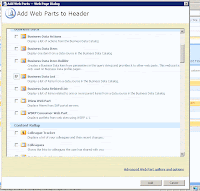
- Select Business Data List and Click OK
- A Business Data List will appear within the "Add a web part" block
- Click on "Open the tool pane"
- A Business Data List tool bar will open on the right side
- Click on the picker button and choose "Product"
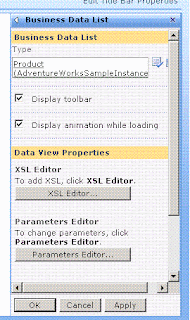
- Click OK in BDL pane
- Exit the edit mode

- In the search criteria, enter your criteria where you will get all the products associated with the criteria.
Limitation of BDC
References
r1 : Business Data Catalog Overview [link]
r2 : SharePoint 2007: BDC - The Business Data Catalog [link]
r3 : Business Data Web Parts [link]
r4 : Adventure Works [link]
r5 : SharePoint Server 2007 SDK [link]
Notes
n1 : There are tools (Microsoft and Third parties) that help write BDC metadata XML.
Power of BDC
Consider this, there is a web-service (or database) which exposes your Line of Business (LOB) data and you want to see the data on SharePoint. This can be done by writing a custom web-part. You will need a developer to write that custom web-part. Now assume the web-service requires credentials based authentication. Hopefully the developer can still handle that. If the web-service requires unique credentials for each SharePoint user, you will require a smart developer. What about you want to search the data fetched by the web-part ?
BDC's goal is to enable you to surface business data (some of the aspects described above) in Office SharePoint Server 2007 with minimal coding effort. BDC requires one to write [n1] XML based metadata.
BDC Web Part - Adventure Works Sample
MOSS 2007 comes with five Business Data Web Parts [r3] which can display a list of entity instances, display details of an entity instance, display list of related entity instances, display a list of actions associated with an entity and create a Business Data item.
In this sample, a list of entity instances are displayed using Business Data List (BDL) with Adventure Works [r4] database as LOB.

Figure - List of Products in Adventure Works.
Steps in displaying the products list
Step 1 : Install the adventure works 2000 database [r4]
Step 2 : Install SharePoint Server 2007 SDK [r5]
Step 3 : Upload BDC metadata model for Adventure Works from SDK
- Open MOSS Central Administration
- Goto Shared Services Administration page for your shared service
- Click on "Import application definition" in the Business Data Catalog block
- Browse the adventure works model XML from SDK (C:\Program Files\2007 Office System Developer Resources\Samples\Business Data Catalog\AdventureWorks Samples\AdventureWorks2000.xml)
- Click upload

Figure - Model for Adventure Works uploaded.
At this step the BDC application definition for adventure works is uploaded.
Step 4 : Add BDL for AdventureWorks products.
- Goto your site (MySite)
- Click on Site Actions > Edit Page
- Choose to add a new Web Part

- Select Business Data List and Click OK
- A Business Data List will appear within the "Add a web part" block
- Click on "Open the tool pane"
- A Business Data List tool bar will open on the right side
- Click on the picker button and choose "Product"

- Click OK in BDL pane
- Exit the edit mode

- In the search criteria, enter your criteria where you will get all the products associated with the criteria.
Limitation of BDC
- BDC only allows read functionality on business data. That means BDC does not support CUD (Create, Update, Delete) on business entities.
- BDC metadata XML is tough to understand. If one is not using tools, model is hard to manage and will not necessarily qualify as "no code" solution.
- BDC supports only web-service and database based LOB.
References
r1 : Business Data Catalog Overview [link]
r2 : SharePoint 2007: BDC - The Business Data Catalog [link]
r3 : Business Data Web Parts [link]
r4 : Adventure Works [link]
r5 : SharePoint Server 2007 SDK [link]
Notes
n1 : There are tools (Microsoft and Third parties) that help write BDC metadata XML.
Subscribe to:
Posts (Atom)

